

1. Introduction and Terminology
In the context of supply chain management, the SD (Sales and Distribution) module plays a crucial role in connecting the business’s sales operations with its distribution network. It is a key component of ERP (Enterprise Resource Planning) systems, particularly in SAP (Systems, Applications, and Products), which is widely used across industries.
Here's an overview of the role of the SD module in the supply chain:
1. Order Management
- The SD module manages customer orders from initial request to final delivery. This includes order creation, processing, and tracking. It ensures the business can efficiently handle sales orders, returns, and exchanges.
- Integration with other modules (like MM (Material Management)) helps in checking stock availability and generating procurement requests for items that are out of stock.
2. Pricing and Billing
- It defines the pricing procedure, discounts, and tax calculation. The module ensures the correct pricing is applied to sales orders, based on predefined conditions (e.g., customer, region, or product type).
- The billing process involves generating invoices, processing credit memos, and handling payments, ensuring proper revenue recognition for the company.
3. Shipping and Logistics
- The SD module is responsible for shipping, managing the process of picking, packing, and shipping goods to customers.
- It integrates with Warehouse Management (WM) and Transportation Management (TM) to optimize the flow of goods and reduce delays in delivery.
4. Customer Relationship Management (CRM)
- The SD module works in conjunction with CRM functionalities to provide real-time insights into customer interactions and preferences. This helps in maintaining strong relationships with customers, addressing complaints, and improving customer satisfaction.
5. Inventory Management
- By integrating with the MM module, the SD module plays a role in controlling and maintaining inventory levels. It tracks product availability in real-time, ensuring that sales orders are fulfilled efficiently.
6. Credit and Risk Management
- The SD module checks customers' credit limits and manages risk by ensuring that sales are only made to customers with approved credit status. This helps in minimizing financial risk and preventing bad debt.
7. Sales Forecasting and Analytics
- Data captured through the SD module can be used for sales forecasting and analytics, providing insights into customer demand, order trends, and sales performance. This information helps supply chain planners in forecasting inventory needs and optimizing stock levels.
8. Returns and Complaints Management
- The SD module includes processes for handling returns (due to damaged goods or other reasons) and customer complaints. This process can be integrated with reverse logistics to manage returned products efficiently.
9. Supply Chain Visibility
- With its ability to track the entire flow of sales, from order to delivery, the SD module offers visibility into the supply chain. This helps businesses better manage lead times, plan production schedules, and coordinate with suppliers and logistics partners.
2. Terminology in the SAP SD module
Sales Organization
1. Sales Order
A sales order is a document that confirms a customer's request to purchase goods or services. It represents an agreement between a business and its customer and contains detailed information regarding the transaction, such as
- Customer details: Who is placing the order?
- Material or product: What is being sold.
- Order quantity: How much of the product is required.
- Delivery date: When the goods need to be delivered.
- Pricing information: How much the customer will pay, including discounts or promotions.
The sales order is the starting point for the entire order-to-cash process. It is created in the SD module, and once the order is confirmed, it triggers other processes such as availability checks, delivery planning, and billing.
2. Outbound Delivery
Outbound delivery refers to the process of physically shipping goods to the customer. After a sales order is confirmed, an outbound delivery document is created to handle the distribution and shipping of the ordered goods.
- The outbound delivery includes details like
- Shipping point: The location where goods will be shipped from.
- Shipping method: How the goods will be transported (e.g., truck, air, or sea).
- Quantity of items being shipped: The exact amount of goods being dispatched.
- Delivery date: When the customer is expected to receive the shipment.
It is tied to inventory management as well, as it impacts stock levels and triggers picking (getting the items from the warehouse), packing, and transportation processes. Once goods are shipped and the delivery is confirmed, the process can move to the invoicing phase.
3. Customer Business Partner
A customer business partner refers to a business partner who is involved in the sales process. In SAP, a business partner (BP) can represent different entities (such as customers, vendors, or contacts). For sales orders, the customer business partner represents the customer who is placing the order.
- Business partners are typically created and maintained in the system with key details such as
- Customer name and address
- Contact information
- Credit limits
- Tax information
- Shipping preferences
In SAP, the business partner model allows for better data integration and flexibility in handling various partners involved in a transaction, including customers, contacts, and suppliers.
4. Partner Functions
Partner functions refer to the different roles or responsibilities that different partners can have in a sales transaction. Each sales order involves multiple business partners, and each one may have a specific function in the process. Some common partner functions include
- Sold-to Party: The customer who places the order and is responsible for paying.
- Ship-to Party: The recipient of the goods being shipped (may be different from the Sold-to Party).
- Bill-to Party: The party that receives the invoice and is responsible for making payments.
- Payer: The person or organization who actually pays for the goods, which could be the same as the sold-to party or different.
- Contact Person: A person at the customer’s end who handles communication about the order.
Partner functions help in managing relationships with different parties involved in the transaction, ensuring the right information is linked to the correct entities during the sales and delivery process.
5. Billing
Billing is the process of creating invoices to charge customers for the goods or services provided. After the goods are delivered, the billing process generates an invoice that details the amount owed by the customer based on the sales order and any other factors (e.g., discounts, taxes).
- In SAP, the billing document is created based on delivery or sales order data.
- Billing types: You can have different types of billing documents, such as invoices, credit memos, or debit memos, depending on the nature of the transaction.
- The billing document can also be linked to financial accounting, enabling automatic posting to accounts receivable.
Billing is crucial for revenue generation and financial accounting in the company. It ensures that payments are tracked and the business is paid for the products or services delivered.
6. Invoice
An invoice is a formal document that provides a summary of the sales transaction, detailing the products or services sold, the quantity, the agreed-upon price, and any additional charges (e.g., taxes or delivery costs). The invoice is sent to the customer to request payment.
- The invoice typically includes
- Invoice number: Unique identifier for the invoice.
- Customer information: Who the invoice is being sent to.
- Details of products/services sold, including the quantities and prices.
- Total amount due: The amount the customer needs to pay.
- Payment terms: When the payment is due (e.g., within 30 days).
In SAP, once the billing document is generated, an invoice is created and sent to the customer. It is often used as the basis for payment collection and is integrated into financial accounting for tracking revenue.
3. SAP SD general business process flow
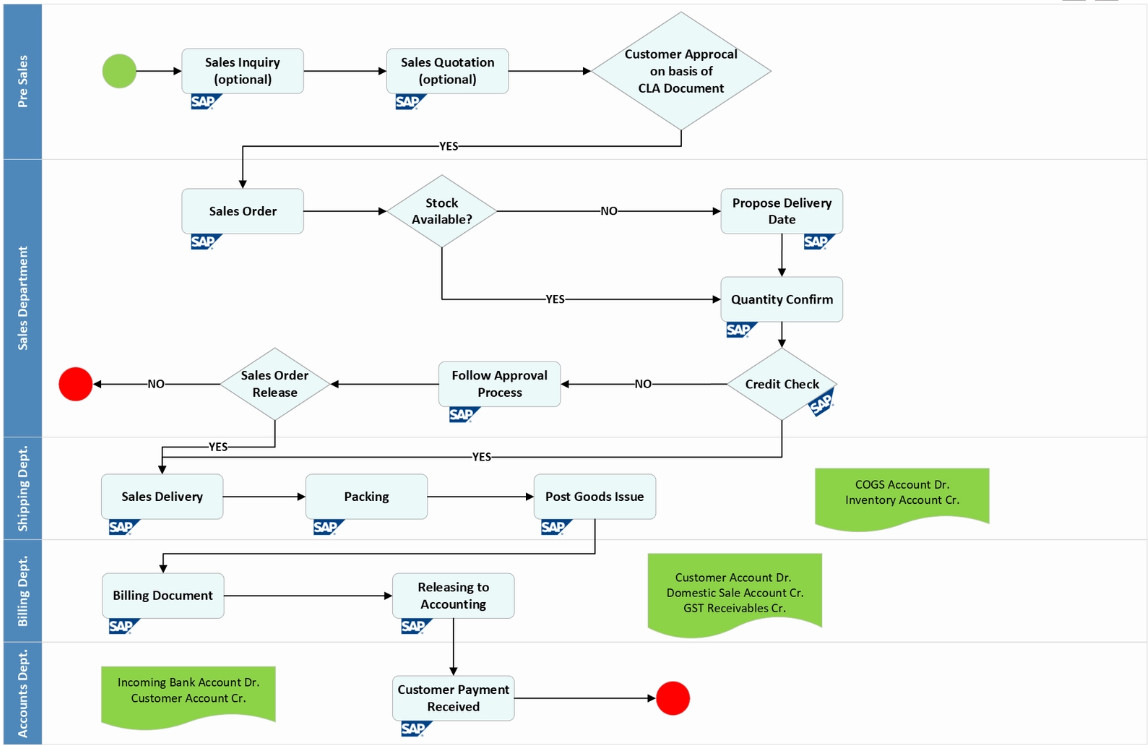
Swimlanes: The diagram is divided into horizontal sections called swimlanes, each representing a different department or stage:
- Pre-Sales: Activities before a formal order is placed.
- Sales Department: Core sales order processing.
- Shipping Dept.: Handling delivery and goods issues.
- Billing Dept.: Creating invoices.
- Accounts Dept.: Managing payments and accounting entries.
Process Flow:
Pre-Sales:
- Sales Inquiry (optional): A customer expresses interest. This is optional, as some orders might come directly without prior inquiry.
- Sales Quotation (optional): If an inquiry is made, a quotation outlining prices and terms may be provided.
- Customer Approval on the Basis of CLA Document: The customer approves the quotation or a contract (CLA—likely Contractual Legal Agreement).
Sales Department:
- Sales Order: A formal sales order is created in SAP.
- Stock Available?: The system checks if the requested goods are in stock.
- NO: If not available, a delivery date is proposed, and the quantity is confirmed with the customer. This likely involves procurement or production planning.
- YES: If available, the process continues.
- Sales Order Release: The sales order is released for further processing.
- NO: If not released (perhaps due to credit issues), an approval process is followed, including a credit check.
- YES: The process proceeds to delivery.
Shipping Dept.:
- Sales Delivery: A delivery document is created in SAP, initiating the shipping process.
- Packing: The goods are physically packed for shipment.
- Post Goods Issue (PGI): The goods are officially shipped, and inventory is updated in SAP. This also triggers the following accounting entry:
- COGS Account Dr. (Cost of Goods Sold - Debit): Increases the expense.
- Inventory Account Cr. (Inventory - Credit): Decreases the asset.
Billing Dept.:
- Billing Document: An invoice is created in SAP.
- Releasing to Accounting: The billing information is transferred to the accounting module, creating the following accounting entry:
- Customer Account Dr. (Accounts Receivable - Debit): Increases the asset (what the customer owes).
- Domestic Sale Account Cr. (Sales Revenue - Credit): Increases the revenue.
- GST Receivables Cr. (GST - Credit): Records the goods and services tax owed to the government.
Accounts Dept.:
- Customer Payment Received: The customer makes a payment.
- Incoming Bank Account Dr. (Bank Account - Debit): Increases the asset.
- Customer Account Cr. (Accounts Receivable—Credit): Decreases the asset (the customer no longer owes this amount).
Next → Part 2: SAP Sales & Distribution: Enterprise Structure Configuration
All parts in the SAP SD series
- Part 1: SAP Sales & Distribution: Introduction and Terminology (you are here)
- Part 2: SAP Sales & Distribution: Enterprise Structure Configuration
- Part 3.1 : SAP Sales & Distribution: Sales Document Types - Sales Order Types
- Part 3.2: SAP Sales & Distribution: Item Categories
- Part 3.3 SAP Sales & Distribution: Material Types, Material Master - Sales Views and Item Category determination
- Part 3.4 SAP Sales & Distribution: Schedule Line Categories and Copy Control
- Part 3.5. Output Determination in SAP SD
- Part 3.6. Pricing Procedure in SAP SD - Condition types, Pricing Procedure (Define And Assign)
- Part 3.7 Taxing in SAP SD - Tax Pricing Procedure
- Part 3.8 Route determination, Availability check and dates scheduling in SAP SD
- Part 4.1: Master Data - Business Partner - Customer Master
- Part 4.2 : Master Data - Business Partner - Create Sales Customer in role FLCU01
- Part 4.3 : Master Data - Business Partner -Create finance customer in role FLCU00
- Part 4.4: Master Data in SAP SD - Bill of materials
- Part 5: Business Scenarios in sales and distribution (Business Process Flows )
- Part 6 : Presales Process (Inquiries and Quotations)
- Part 7.1: Sales Order Processing in SD- Sale of kits
- Part 7.2: Sales Order Processing in SD- Sale of normal items (Batch managed, Serialized)
- Part 7.3: Sales Order Processing in SD- Cash Sales and Rush Order
- Part 8.1: Outbound Delivery Processing -Outbound Delivery types
- Part 8.2: Outbound Delivery Processing -Outbound Delivery Item Types
- Part 8.3: Outbound Delivery Processing -Output processing
- Part 8.4: Outbound Delivery Testing
- Part 9.1 : Shipment process in SAP SD: Introduction, terminology and configuration
- Part 9.2 : Shipment process in SAP SD: Shipment pricing procedure
- Part 9.3 : Shipment process in SAP SD: Testing Shipment Procedure
- Part 10.1: Financial settlement from customer - Concept and terminology
- Part 10.2: Financial settlement from customer - Billing Document (Configuration and Testing)
- Part 10.3: Financial settlement from customer - Accounting Documents
- Part 11.1: Additional Functionalities: Credit Check
- Part 11.2: Additional Functionalities: Delivery Block and Reason for Rejections


