

BUSINESS PROCESS FLOWS IN SAP SD
The following important business processes are valid in SAP SD.
Presales
- Inquiries and quotations
Sales Order Processing
- Sales of Kits (BOMs) and Normal Products
- Item proposal
- Batch management and determination
- Available to promise and schedule in sales order
- Pricing procedure determination
- Serial Numbers
- Cash sales
- Rush Order sales
- Free Goods
- Contracts and scheduling agreements
- Consignment process
- Fill-up
- Issue
- Returns
Logistics execution
- Delivery creation
- Route determination
- Delivery processing
- Shipment creation
Financial Settlement
- Revenue account determination (integration between SAP SD and FICO)
- Invoice/billing creation
- periodic
- milestone
- pro forma invoice
- Customer credit management and customer payment
Returns and post-sales services
- Customer returns
- Credit Memo and Debit Memo
- Invoice correction
The above processes can be depicted as the following flow diagram
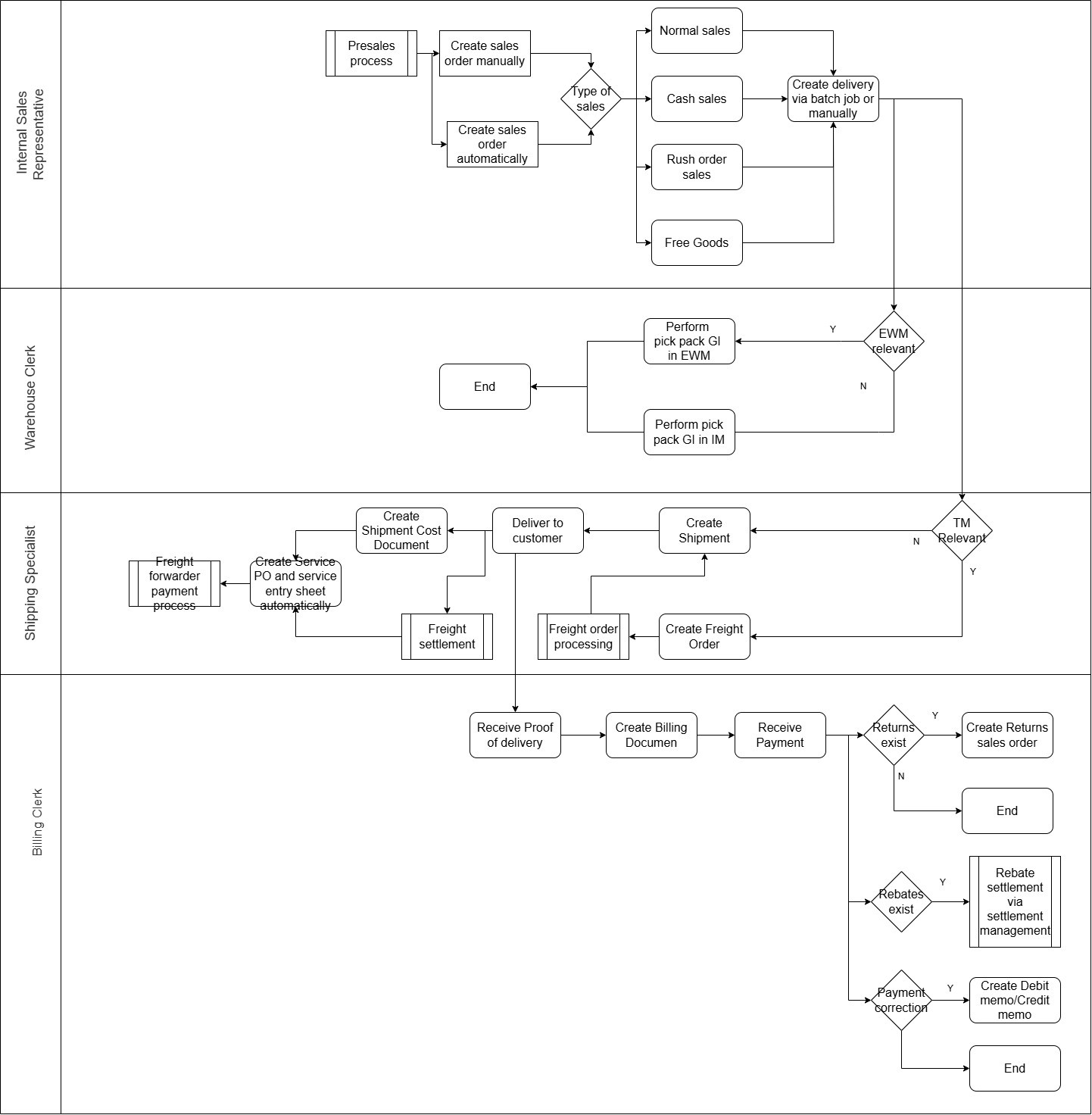
What each process involves
The table below links every business process to the main SAP documents and transactions, and to the part of this series that covers it in detail.
| Process | What happens | Key documents / T-codes | Covered in |
|---|---|---|---|
| Presales | The customer asks for prices and availability; you reply with a binding offer. | Inquiry (VA11), quotation (VA21) | Part 6: Presales Process |
| Sales order – kits | A header material is sold and its components are exploded from a sales BOM. | Sales order (VA01), sales BOM (CS01) | Part 7.1: Sale of kits |
| Sales order – batch / serial items | Batches are determined automatically and serial numbers are captured. | VA01, batch determination, serial number profile | Part 7.2: Batch managed and serialized items |
| Cash sales and rush orders | Delivery is created immediately; for cash sales the invoice is printed at once. | Order types BV and SO | Part 7.3: Cash sales and rush order |
| Pricing and taxes | Base price, discounts, freight and taxes are calculated by the pricing procedure. | Condition types PR00, K004, KF00, MWST | Part 3.6: Pricing procedure, Part 3.7: Taxes |
| Availability and scheduling | The system checks stock and calculates material availability, loading, goods issue and delivery dates. | ATP check, route determination | Part 3.8: Route determination and scheduling |
| Delivery processing | An outbound delivery is created for picking, packing and goods issue. | VL01N, VL10C, VL02N | Part 8.1 to Part 8.4 |
| Shipment | Deliveries are grouped into a shipment, the forwarder is assigned and freight cost is calculated. | VT01N, shipment cost document (VI01) | Part 9.1 to Part 9.3 |
| Billing and payment | The invoice is created and posted to accounting; the customer payment clears it. | Billing (VF01), revenue account determination (VKOA) | Part 10.2: Billing document, Part 10.3: Accounting documents |
| Credit management | Orders are blocked if the customer exceeds the credit limit. | Credit check (static / dynamic) | Part 11.1: Credit check |
| Returns and corrections | Goods come back, or the invoice amount is corrected with a credit or debit memo. | Returns order (RE), credit memo request (CR), debit memo request (DR) | Part 10.1: Financial settlement concept |
The order-to-cash document flow
Every step creates a document that is copied from the previous one, so you can always trace an invoice back to the original inquiry:
Inquiry → Quotation → Sales order → Outbound delivery → Goods issue (material document) → Billing document → Accounting document → Customer payment
Copy control decides which document can be created from which, and which data is copied. You can see the complete chain for any order in the document flow (button in VA03, VL03N or VF03).
Key takeaways
- SD covers the whole cycle from the first customer contact to the incoming payment.
- Logistics execution (delivery and shipment) links SD with inventory and warehouse management; billing links SD with finance.
- Each process in this map has its own configuration, which the rest of this series walks through step by step.
← Previous: Part 4.4: Master Data in SAP SD - Bill of materials
Next → Part 6 : Presales Process (Inquiries and Quotations)
All parts in the SAP SD series
- Part 1: SAP Sales & Distribution: Introduction and Terminology
- Part 2: SAP Sales & Distribution: Enterprise Structure Configuration
- Part 3.1 : SAP Sales & Distribution: Sales Document Types - Sales Order Types
- Part 3.2: SAP Sales & Distribution: Item Categories
- Part 3.3 SAP Sales & Distribution: Material Types, Material Master - Sales Views and Item Category determination
- Part 3.4 SAP Sales & Distribution: Schedule Line Categories and Copy Control
- Part 3.5. Output Determination in SAP SD
- Part 3.6. Pricing Procedure in SAP SD - Condition types, Pricing Procedure (Define And Assign)
- Part 3.7 Taxing in SAP SD - Tax Pricing Procedure
- Part 3.8 Route determination, Availability check and dates scheduling in SAP SD
- Part 4.1: Master Data - Business Partner - Customer Master
- Part 4.2 : Master Data - Business Partner - Create Sales Customer in role FLCU01
- Part 4.3 : Master Data - Business Partner -Create finance customer in role FLCU00
- Part 4.4: Master Data in SAP SD - Bill of materials
- Part 5: Business Scenarios in sales and distribution (Business Process Flows ) (you are here)
- Part 6 : Presales Process (Inquiries and Quotations)
- Part 7.1: Sales Order Processing in SD- Sale of kits
- Part 7.2: Sales Order Processing in SD- Sale of normal items (Batch managed, Serialized)
- Part 7.3: Sales Order Processing in SD- Cash Sales and Rush Order
- Part 8.1: Outbound Delivery Processing -Outbound Delivery types
- Part 8.2: Outbound Delivery Processing -Outbound Delivery Item Types
- Part 8.3: Outbound Delivery Processing -Output processing
- Part 8.4: Outbound Delivery Testing
- Part 9.1 : Shipment process in SAP SD: Introduction, terminology and configuration
- Part 9.2 : Shipment process in SAP SD: Shipment pricing procedure
- Part 9.3 : Shipment process in SAP SD: Testing Shipment Procedure
- Part 10.1: Financial settlement from customer - Concept and terminology
- Part 10.2: Financial settlement from customer - Billing Document (Configuration and Testing)
- Part 10.3: Financial settlement from customer - Accounting Documents
- Part 11.1: Additional Functionalities: Credit Check
- Part 11.2: Additional Functionalities: Delivery Block and Reason for Rejections


