
Financial Settlement—Concept
After creating a sales order and delivering the goods successfully, we have to create a customer invoice and receive payment. It happens as per the following flow.
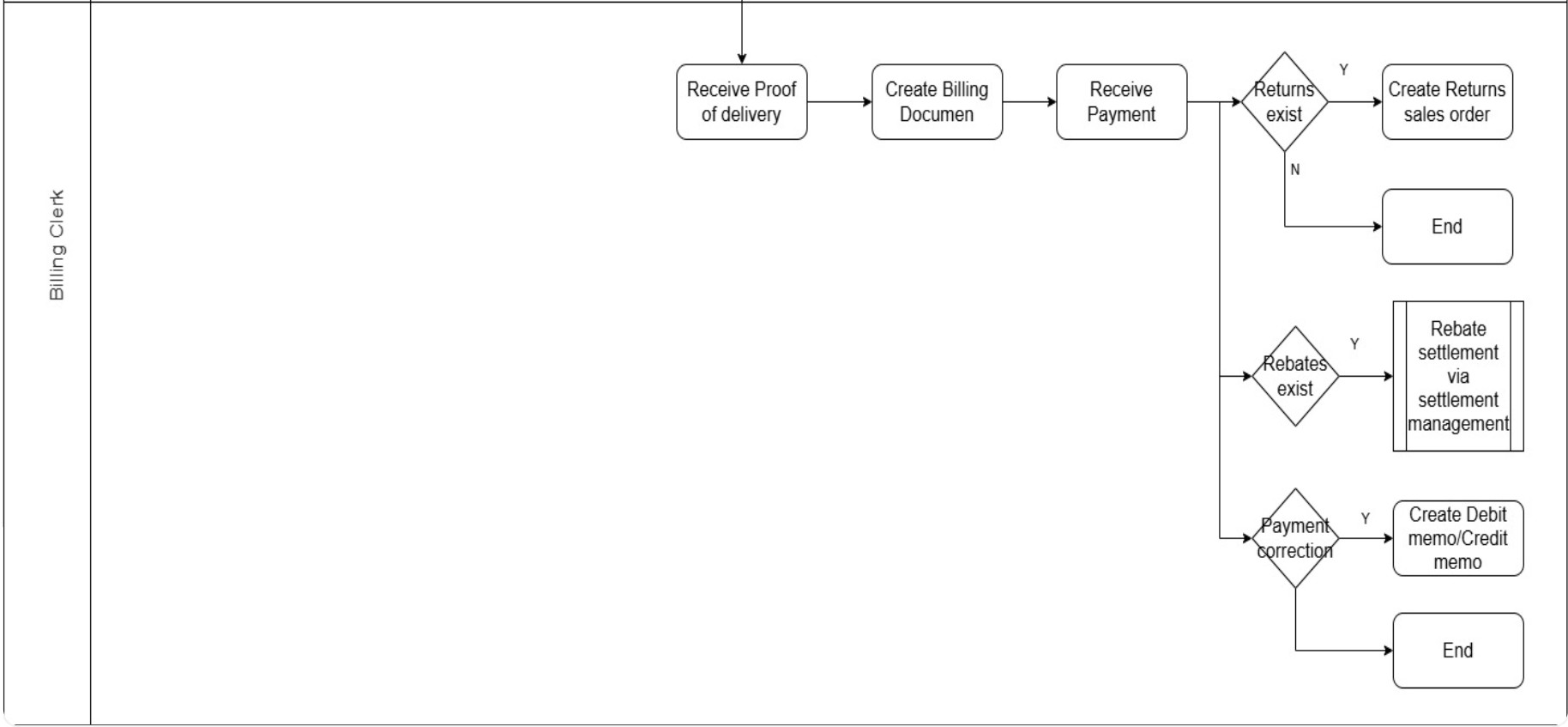
Billing and receiving payment
- The proof of delivery step confirms the delivery is successfully completed at the customer's end, and to confirm proof of delivery, we use the t-code VLPODQ. If proof of delivery fails, the billing document creation fails.
- The next step is to create a billing document using the t-code VF01. The billing document contains the net price deduced from the pricing conditions of the sales order.
- The prices specified for different conditions are posted against different G/L accounts, and the G/L accounts are determined based on the configuration for revenue account determination.
- The billing document, also called a customer invoice, will be sent to the customer in the form of a PDF or electronically using EDI
- The customer, after receiving the invoice, sends payment. The payment receipt can be posted offline using t-code F-28. Alternatively, the payment can be processed online in real time using the SAP digital payments add-on
Returns Management
In case of returns, a return sales order is created with reference to the original sales order. Later a return delivery is created, and a goods receipt is done to receive the goods back.
Corrections in Invoice
In SAP Sales and Distribution (SD), credit and debit memos are crucial billing documents used to correct or adjust previously issued invoices.
Credit Memo:
- A credit memo reduces the amount a customer owes. It's used when a customer is overcharged, returns goods, or receives a discount after the initial invoice. Essentially, it "credits" the customer's account.
- It is used for returning defective goods, granting discounts or rebates, and correcting billing errors (e.g., overcharging).
- It reduces receivables in accounting (FI).
Debit Memo:
- A debit memo increases the amount a customer owes. It's used when a customer was undercharged in the original invoice. Essentially, it "debits" the customer's account.
- It is used for correcting billing errors (e.g., undercharging) and charging for additional services or items not included in the original invoice.
- increases receivables in accounting (FI).
Rebates Management
To incentivize customers who do a large volume of business, a sales rebate is a special type of discount that is granted to a customer retroactively, based on their accumulated sales volume over a specific period.
To enable rebates, SAP SD uses condition contract management. It typically has the following flow:
- Create a rebate agreement in WCOCO (this contains details of the customer, settlement date, and the rebate percentage)
- Create settlement document using t-code WB2R_SC
- A credit memo is created automatically for the purpose of settlement of the rebate
← Previous: Part 9.3 : Shipment process in SAP SD: Testing Shipment Procedure
Next → Part 10.2: Financial settlement from customer - Billing Document (Configuration and Testing)
All parts in the SAP SD series
- Part 1: SAP Sales & Distribution: Introduction and Terminology
- Part 2: SAP Sales & Distribution: Enterprise Structure Configuration
- Part 3.1 : SAP Sales & Distribution: Sales Document Types - Sales Order Types
- Part 3.2: SAP Sales & Distribution: Item Categories
- Part 3.3 SAP Sales & Distribution: Material Types, Material Master - Sales Views and Item Category determination
- Part 3.4 SAP Sales & Distribution: Schedule Line Categories and Copy Control
- Part 3.5. Output Determination in SAP SD
- Part 3.6. Pricing Procedure in SAP SD - Condition types, Pricing Procedure (Define And Assign)
- Part 3.7 Taxing in SAP SD - Tax Pricing Procedure
- Part 3.8 Route determination, Availability check and dates scheduling in SAP SD
- Part 4.1: Master Data - Business Partner - Customer Master
- Part 4.2 : Master Data - Business Partner - Create Sales Customer in role FLCU01
- Part 4.3 : Master Data - Business Partner -Create finance customer in role FLCU00
- Part 4.4: Master Data in SAP SD - Bill of materials
- Part 5: Business Scenarios in sales and distribution (Business Process Flows )
- Part 6 : Presales Process (Inquiries and Quotations)
- Part 7.1: Sales Order Processing in SD- Sale of kits
- Part 7.2: Sales Order Processing in SD- Sale of normal items (Batch managed, Serialized)
- Part 7.3: Sales Order Processing in SD- Cash Sales and Rush Order
- Part 8.1: Outbound Delivery Processing -Outbound Delivery types
- Part 8.2: Outbound Delivery Processing -Outbound Delivery Item Types
- Part 8.3: Outbound Delivery Processing -Output processing
- Part 8.4: Outbound Delivery Testing
- Part 9.1 : Shipment process in SAP SD: Introduction, terminology and configuration
- Part 9.2 : Shipment process in SAP SD: Shipment pricing procedure
- Part 9.3 : Shipment process in SAP SD: Testing Shipment Procedure
- Part 10.1: Financial settlement from customer - Concept and terminology (you are here)
- Part 10.2: Financial settlement from customer - Billing Document (Configuration and Testing)
- Part 10.3: Financial settlement from customer - Accounting Documents
- Part 11.1: Additional Functionalities: Credit Check
- Part 11.2: Additional Functionalities: Delivery Block and Reason for Rejections