Introduction
SAP Production Planning (SAP PP) is a key module in the SAP ERP (Enterprise Resource Planning) system that helps organizations plan and manage their manufacturing processes. It plays a central role in ensuring that the supply chain runs efficiently by coordinating materials, production capacity, and scheduling.
Core Components of SAP PP:
Material Requirement Planning (MRP)
Calculates material requirements based on current stock, demand forecasts, and lead times.Bill of Materials (BOM)
Lists all raw materials and components required to manufacture a product.Work Center
Represents physical locations (machines, people, etc.) where operations are carried out.Routing
Defines the sequence of operations to produce a material, along with the time required.Production Orders
Formal instructions for producing a specific quantity of material, including dates, materials, and routing.Capacity Planning
Checks the workload of work centers and helps avoid bottlenecks.Demand Management
Helps forecast and plan customer demands.Shop Floor Control
Manages and monitors the progress of production orders on the shop floor.
Process Flow—Make-to-Stock Process
Make-to-stock (MTS) is a production strategy where products are manufactured in advance based on forecasted customer demand, rather than actual customer orders. The finished goods are produced and stored in inventory until a customer places an order.
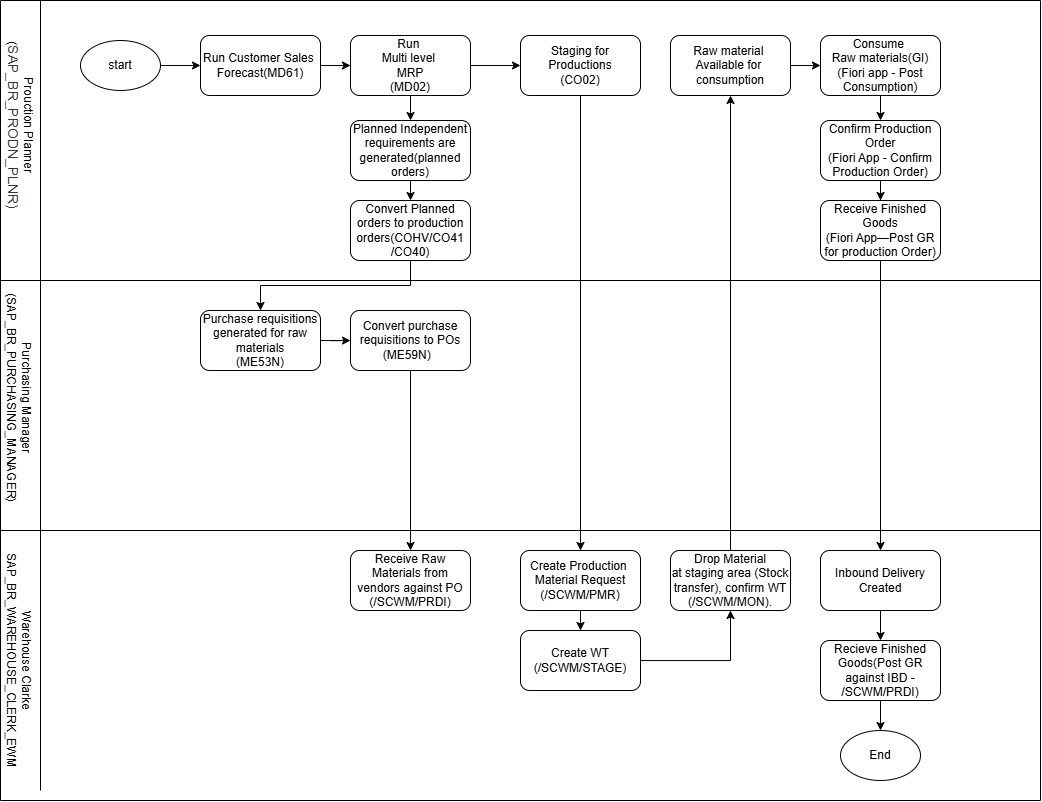
1. Production Planning (Handled by Production Planner)
Step-by-Step:
Run Customer Sales Forecast—
MD61Input forecast demand for finished products.
Run Multi-Level MRP—
MD02System generates:
Planned Independent Requirements
Planned orders for production
Purchase requisitions for raw materials
Convert Planned Orders to Production Orders –
COHVPlanned orders are converted into executable production orders.
Staging for Productions –
CO02Raw materials are staged (prepared) for production use.
2. Purchasing (Handled by Purchasing Manager)
Step-by-Step:
Purchase Requisitions for Raw Materials –
ME53NGenerated automatically via MRP.
Convert Requisitions to Purchase Orders (POs) –
ME59NPurchasing creates POs to send to vendors.
3. Warehouse Operations (Handled by Warehouse Clerk in SAP EWM)
Step-by-Step:
Receive Raw Materials –
/SCWM/PRDIRaw materials are received in the warehouse against POs.
Create Production Material Request –
/SCWM/PMRA request is created to move raw materials to production staging.
Create Warehouse Task (WT) –
/SCWM/STAGEA task is created to move materials.
Drop Materials at Staging Area & Confirm WT –
/SCWM/MON
Materials are moved and confirmed for use in production.
4. Production Execution (Back to Production Planner)
Step-by-Step:
Consume Raw Materials (Goods Issue) – Fiori App
Raw materials are issued to production order.
Confirm Production Order – Fiori App
Confirms execution of production.
Receive Finished Goods (Goods Receipt) – Fiori App
Finished products are received into inventory.
5. Finished Goods Handling (Warehouse Clerk)
Step-by-Step:
Inbound Delivery Created
The system creates an IBD (Inbound Delivery) document for finished goods.
Receive Finished Goods Against IBD –
/SCWM/PRDI
The warehouse receives and posts goods into stock.
Next → Part 2: Sap production planning - Setting up master data and configuration (BOM,WorkCenter)
All parts in the SAP PP series
- Part 1 : SAP Production Planning : Introduction and terminology (you are here)
- Part 2: Sap production planning - Setting up master data and configuration (BOM,WorkCenter)
- Part 3 : Sap production planning - Setting up master data and configuration(Routing,Production control cycle)
- Part 4.1 : Sap production planning - Material Requirement Planning(1)
- Part 4.2 : Sap production planning - Material Requirement Planning(2)
- Part 4.3 - SAP Production planning - Material requirement planning(3)
- Part 5 : SAP Production Planning(PP) -Document type setup in PP
- Part 6- Testing SAP PP Process Flow- Maintain PIR, Run MRP, Create Planned Order
- Part 7: SAP Production Planning (PP): Run MRP for components, Create Purchase Requisitions/Orders and and Receive goods
- Part 8: SAP production planning: Consuming raw materials and receiving finished goods